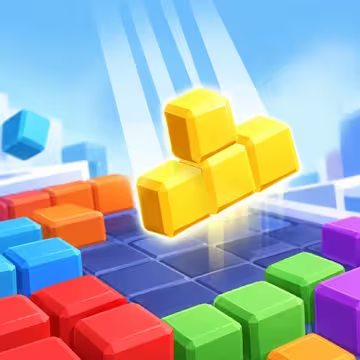
How to Play Block Blast 3D
- Drag each block from the tray at the bottom and drop it onto the board with your mouse or finger.
- Fill an entire row or column to clear it and score points.
- Blocks cannot be rotated, so plan where each one goes.
- Press the Pause button to pause the game and toggle music and sound.
The Idea Behind the Game
Block Blast 3D was made for players who enjoy a relaxing puzzle that still makes you think. You only hold three blocks at a time, and every placement affects the moves that follow.
Instead of rushing, the game aims for the satisfying feeling of a row lighting up and vanishing. Moving from 2D to 3D gives the blocks volume, shine, and depth, while the rules stay simple enough for anyone to start right away.
Story
On a softly glowing board floating in a calm blue sky, bright colored blocks arrive three at a time. Your job is to keep the board tidy, letting rows light up and fade away to make room for the next blocks.
Gameplay
Block Blast 3D is a block puzzle played on an 8x8 board. Each round, you receive three blocks in different shapes. Place all three and a new set appears. The game ends when none of the blocks in the tray can fit on the board.
Placing Blocks
Drag a block onto the board and a preview shows where it will land. If there isn’t enough space, the block returns to the tray. Each set of three blocks always comes in three different colors, so they are easy to tell apart.
Clearing Rows and Columns
Fill a row or column to clear it. Rows and columns that are about to be completed light up in the color of the block you are holding. Clearing several lines at once earns a bigger bonus, along with praise like Great!, Amazing!, Terrific!, Fantastic!, and Incredible!.
Combos
Clear lines on consecutive moves to build a combo, and your score multiplies as the chain grows. At the third combo, a pulsing heart and a combo counter appear. If you place three blocks in a row without clearing any line, the combo ends.
Clearing the Whole Board
Clear every block from the board to earn a 300-point bonus and an Unbelievable! message.
Tutorial, Saved Games, and Leaderboard
The first time you play, a three-step tutorial with a pointing hand shows you where to place blocks. An unfinished game is saved so you can continue next time. If your score is high enough, you can enter your name on the leaderboard for the day, week, month, or all time.
Style
3D Graphics
Block Blast 3D uses softly beveled 3D cubes with a moderate shine, sitting on a rounded board with a glowing blue edge. The camera looks down at an angle, so you see the top of each block as well as the depth of the board. Soft shadows under the blocks make them look like they truly rest on the surface.
Colors
Eight bright block colors: pink, red, orange, yellow, blue, green, sky blue, and purple, stand out against the deep blue board. The background is a calm blue gradient with faint diamonds and soft curves, keeping the screen easy on the eyes.
Lighting and Effects
When lines are cleared, beams of light and stars run along the row or column in the color of the block you just placed. New blocks appear with a few sparkles. Big combos give the screen a light shake. The effects stand out enough to mark your progress without covering the board.
Sound
A gentle soundtrack plays along with sound effects for placing blocks, clearing lines, and combos. The combo sounds change as the chain grows, giving a sense of progress when you play well.
Controls
The controls are simple: touch and drag.
Drag and Drop
Press the mouse button or touch a block in the tray, drag it onto the board, and release. The block is lifted slightly ahead of your finger so you can always see where it will land.
Pause
Press the Pause button to stop the game, toggle music, mute sound, go back home, restart, or view the leaderboard.
On Desktop and Mobile
The game runs right in your browser, with mouse controls on desktop and touch controls on mobile.